

How Long Does the RYSE SmartShade Battery Last, and How Do You Charge It?

If you are motorizing your existing shades with RYSE and want to skip the wall outlet, the BatteryPack is what makes it possible. One of the most common questions before going wire-free is simple: how long does the battery last, and how much work is it to keep charged? Here is a clear, accurate answer based on how the RYSE SmartShade and BatteryPack actually work.
Why Battery Life Matters for Wire-Free Smart Shades
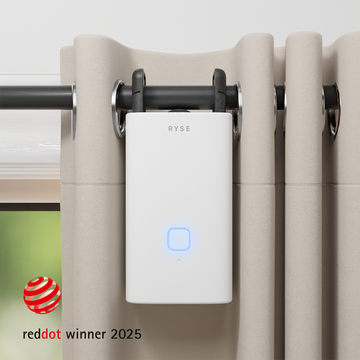
Motorizing a shade is only convenient if you are not thinking about it constantly. A wired SmartShade never needs charging because it draws power from an outlet, but not every window sits near one, and many renters would rather avoid visible cords entirely. That is where the wire-free setup comes in. The BatteryPack clips onto the SmartShade and powers it with no cord running to the wall, so the real question becomes how often you actually need to recharge.
How Long Does the RYSE BatteryPack Last?
The RYSE BatteryPack powers the SmartShade for up to 6 months on a single charge, depending on how often your shade moves. Shades that open and close a few times a day will last longer than shades running many scheduled movements throughout the day. You do not have to guess when it is time to recharge either. When the battery runs low, the RYSE app sends you an alert so you can plan a charge before the shade stops responding.
Wired vs Wire-Free: Which Setup Is Right for You?
| Feature | SmartShade (Wired) | SmartShade (Wire-free) |
|---|---|---|
| Price | $149.99 | $199.99 |
| Power source | Plugs into a wall outlet | Detachable BatteryPack |
| Charging | Never needs charging | Recharge roughly every few months |
| Best for | Windows near an outlet | Windows with no nearby outlet, or a cord-free look |
| Works with beaded-chain shades | Yes | Yes |
Both options motorize your existing beaded-chain roller, zebra, or solar shades. The only difference is how they get power. You can also buy the BatteryPack on its own for $49.99 and add it to a wired SmartShade later.
How to Recharge the BatteryPack
Recharging takes only a few minutes of effort and is designed to happen while you sleep.
Step 1: Detach the BatteryPack
The BatteryPack is quick-release, so you can pull it off the SmartShade without any tools. Your shade stays right where it is on the window.
Step 2: Plug in the micro USB cable
Connect the BatteryPack to the included micro USB cable and any standard USB power source. A full charge takes 6 or more hours, so plugging it in before bed is the easiest routine.
Step 3: Wait for the green light
The indicator light glows orange while charging and turns green once the BatteryPack is full. When you see green, clip it back onto the SmartShade and you are done.
For the full walkthrough, see the RYSE support article on recharging the BatteryPack.
How to Check Your Battery Level Anytime
You do not have to wait for a low-battery alert. Open the RYSE app, tap the SmartShade you want to check, and the current battery level appears in the bottom left corner for that shade. It is a quick way to confirm you have plenty of charge before a busy week or a trip away from home.
Key Benefits of Going Wire-Free
- Up to 6 months of use per charge, so recharging is a rare task rather than a routine chore.
- No wall outlet required, which opens up windows that a wired shade could not reach.
- Detachable design means you charge the BatteryPack, not the whole shade, and the shade stays mounted.
- In-app battery alerts and level checks, so you are never caught by surprise.
- Renter friendly, with no drilling and no permanent wiring, so it moves with you.
Why RYSE Is a Top Choice
RYSE is built around one idea: upgrade the shades you already own instead of replacing them. The SmartShade motorizes your existing beaded-chain shades, and the BatteryPack cuts the last cord so you can place smart shades almost anywhere. If you want the wire-free experience out of the box, the SmartShade (Wire-free) bundles both together. Charge it a couple of times a year, and enjoy hands-free light control the rest of the time.
Share with your community!
In this article
Sign up for our newsletter
Latest from experts

Automate Light for Your Houseplants: Smart Shade Routines for Fall and Winter

The Daylight Handoff: How Smart Shades and Smart Lights Can Take Turns Through the Day
